
Introduction
You'll be replacing the keyboard component of the Sharp PC - MM20!


-
-
Close the laptop.
-
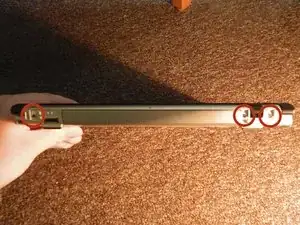
Turn the laptop so that the back is facing you.
-
There will be three screws on the back. Remove each screw by using the screw driver.
-
Keep the three screws in a safe place. A magnetic pad is an example of a safe place.
-
-
-
Next, flip the laptop so that you can see the bottom.
-
Remove the screws shown in the picture.
-
-
-
Next, open the laptop and focus on the front of the base of the laptop.
-
Notice that there are small notches in between the two plates of the laptop. There are several slots such as this that are found across the front base of the laptop.
-
Take a flat edge and wedge it into the slot to pop it open.
-
-
-
Now that all the connections are removed, remove the top of the base from the rest of the computer.
-


To reassemble your device, follow these instructions in reverse order.
